Estimated reading time: 6 minutes
AI automation in healthcare staffing can help recruiters find and contact candidates. But when a long-term care facility needs coverage tomorrow morning, finding someone who’s available is only the first step.
Say your software surfaces a caregiver who can work the shift, but a required credential expires before it starts. Can your team see the issue before confirming the assignment? Who gets notified? If the caregiver can’t take the shift, can your scheduler contact a replacement and see their response without switching tools?
At SIA’s Healthcare Staffing Summit, the BlueSky team heard vendors describe automation for different parts of that process. Some focused on finding and screening candidates. Others emphasized credential readiness or described automation that spans recruiting, scheduling, and timekeeping. Those are different promises. To compare them, bring the same staffing scenario to each demo and ask the vendor to show where its software takes over, where it hands off, and what your team still has to do.
Use the same shift scenario in every demo to see what the software handles and what your team still has to do.
What can AI automation in healthcare staffing do?
AI healthcare staffing tools can help with different tasks, from finding candidates to screening responses. Start with the task your team wants to spend less time on. A tool that finds promising candidates in your existing database isn’t solving the same problem as one that screens responses or flags an expiring credential. Start with the work your team wants to reduce, then ask exactly what the software does.
| Workflow | What to ask the vendor |
|---|---|
| Candidate sourcing and rediscovery | Does the tool find new candidates, surface people already in your database, or both? Can a recruiter see why someone was suggested? |
| Outreach and screening | Does it draft messages, send them, track responses, or flag candidates for recruiter review? Which actions need approval? |
| Credentialing and readiness | Can the team see whether a required credential is missing or will expire before the assignment? Who gets notified, and what depends on your agency’s rules? |
| Scheduling and timekeeping | When a scheduler confirms coverage, what carries forward into timekeeping? What still needs to be entered, checked, or approved? |
Not every useful step needs AI. A rules-based credential alert may be exactly what your team needs. If a vendor describes a step as AI-powered, ask what the AI does and how staff can review its output. If it’s based on a rule, ask who can configure that rule and what happens when it’s triggered. Either way, you want to see what changes for the person doing the work.
A vendor demo test: Follow one shift from match to timekeeping
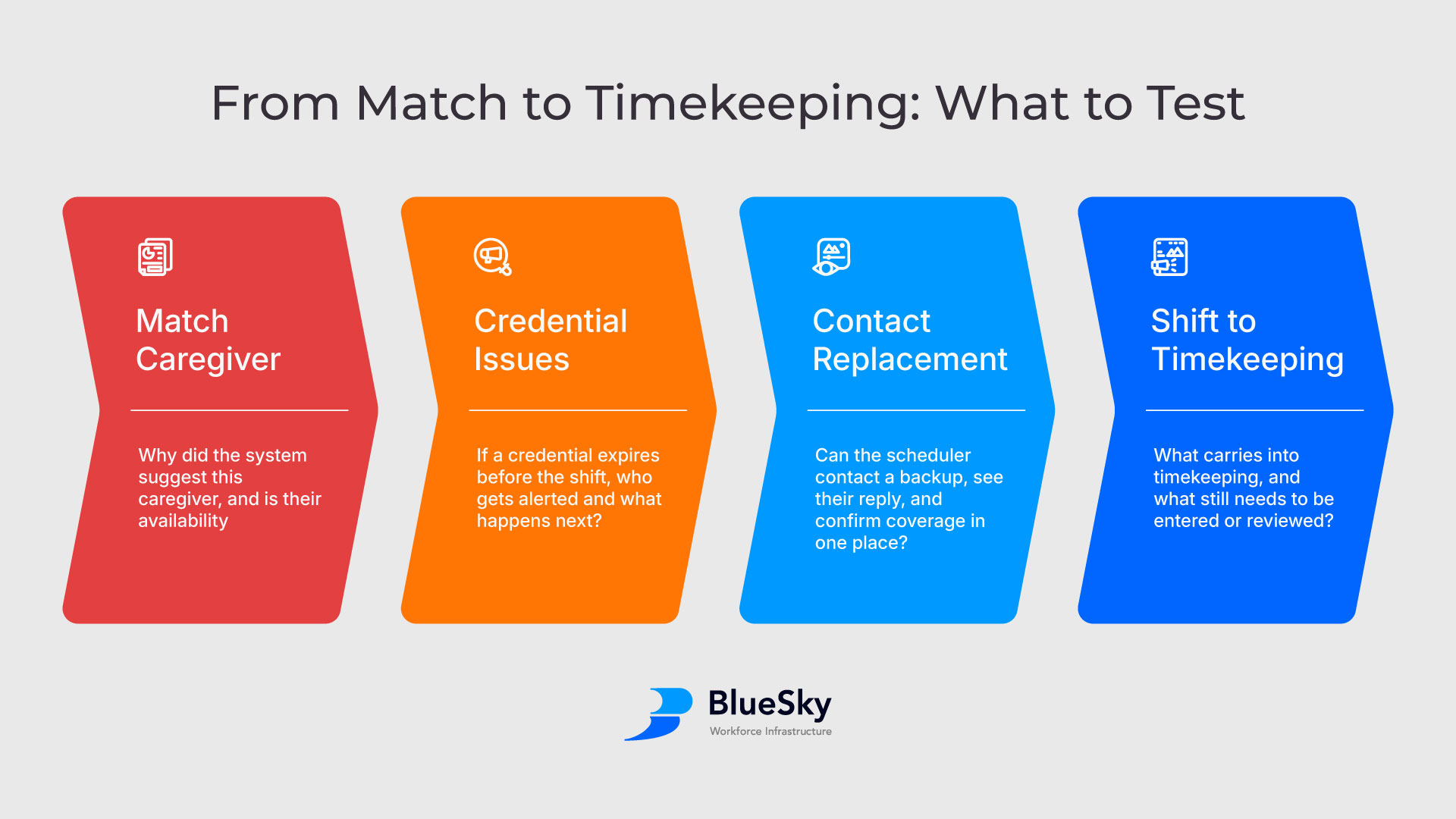
Give the vendor the same scenario up front: A long-term care client needs coverage tomorrow morning. Your first candidate is available, but a required credential expires before the shift. Ask the vendor to use that case throughout the demo rather than switching to a different example for each feature.
1. Show why the caregiver was matched
Ask what the software knows about the caregiver’s availability, qualifications, and assignment history. Which details are current, and which still need to be confirmed? If AI recommended the caregiver, ask the vendor to show what the recruiter can see about why they were recommended.
The distinction that matters here: suggested is not the same as confirmed. Your recruiter should be able to tell what the software knows and what it’s asking them to verify.
2. Show what happens when the credential expires before the shift
Ask the vendor to open the assignment and show where the credential issue appears. Who gets the alert, and when? If no one acts, show what happens next.
If the software can warn a scheduler or prevent an assignment from being confirmed, ask which behavior applies under your agency’s rules. A credential record with an expiration date, an alert to the right people, and a rule that prevents confirmation are three different things. Ask to see the one your team would rely on.
3. Show how the scheduler contacts a replacement
Assume the credential issue can’t be resolved in time. Ask the vendor to show how the scheduler contacts a backup caregiver, sees their response, and confirms coverage. If the first backup declines or doesn’t respond, ask how the scheduler knows it’s time to move on.
This is where you can see whether the software saves work or just shifts it. Does the scheduler have to switch tools to send a message, check a separate inbox for the reply, or update the assignment by hand? A manual step may be fine. What matters is knowing it’s there and who owns it.
4. Follow the confirmed shift into timekeeping
Once the replacement works the shift, ask what carries over automatically and what someone still has to enter or verify. Say the caregiver works different hours than scheduled. Where does the difference appear, and who reviews it?
If the vendor hands off to another system, ask what information goes with the handoff. “We integrate with your timekeeping system” is a starting point. Seeing which fields transfer and which steps stay manual tells you what the integration would mean for your team.
Compare the work left over, not the number of features
When comparing AI automation in healthcare staffing, mark each step as automatic, review required, manual, or outside the system. For anything that requires a person, write down who owns the next action and where they take it. If a step only works with a particular configuration or integration, note that too.
Judge each tool on what it promises. A sourcing tool doesn’t need to manage worked time. It does need to show what it passes to your recruiter or your next system. If a platform promises to connect recruiting, credentialing, scheduling, and timekeeping, ask it to show those handoffs with the same assignment, including what happens when the first match falls through.
Then compare the results against the problem you set out to solve. If recruiters spend too much time finding and contacting candidates, better outreach automation may be your priority. If schedulers already have enough candidates but lose time checking credentials, chasing responses, or re-entering shift information, look closely at what happens after the match.
What this workflow looks like in BlueSky
In BlueSky’s workforce management platform, your team can see the credential issue on the assignment. How the system responds depends on your configured rules, and alerts go to both the recruiter and the caregiver. If the caregiver can’t take the shift, the scheduler can contact a replacement and see their response in BlueSky. Once coverage is confirmed, the shift carries forward into timekeeping.
Bring a staffing scenario your agency handles today to a BlueSky demo. We’ll walk through how it works, what depends on your rules, and which decisions stay with your team.