
Over the course of 2025, BlueSky saw a steady stream of updates aimed at one simple goal: making the work you do every day a little easier and a lot more efficient. Some improvements were highly visible, like new mobile app capabilities and refreshed dashboards. Others worked quietly in the background, adding flexibility to credentialing, reducing manual steps in scheduling and timesheets, and improving clarity across reports, exports, and notifications. This post takes a look back at the most impactful enhancements delivered throughout the year—especially the ones you may have missed.
From smarter credentialing rules to faster scheduling and clearer reporting, here’s a recap of the updates designed to make everyday work in BlueSky easier.
Key Medical Staffing Software Updates in 2025:
1. Required Docs Overhaul
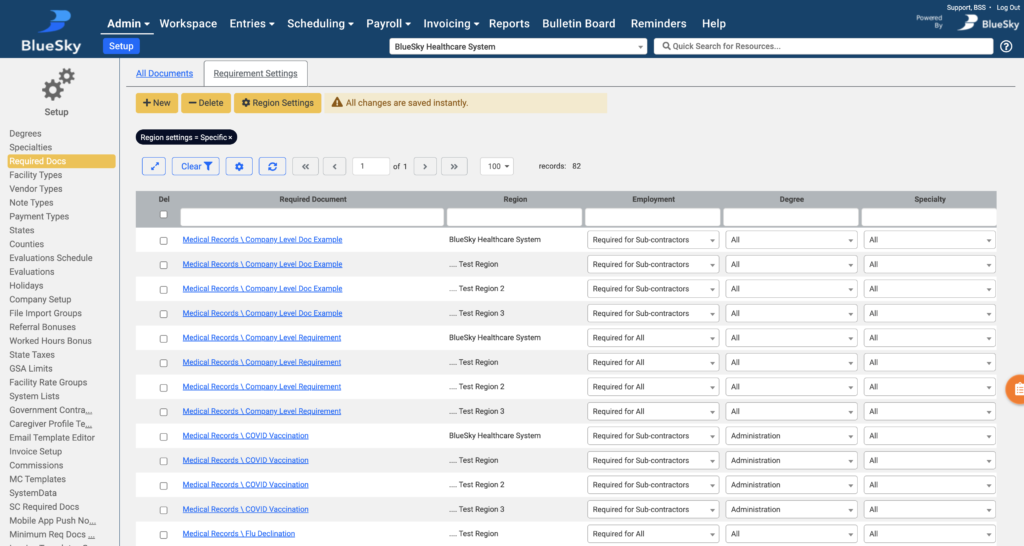
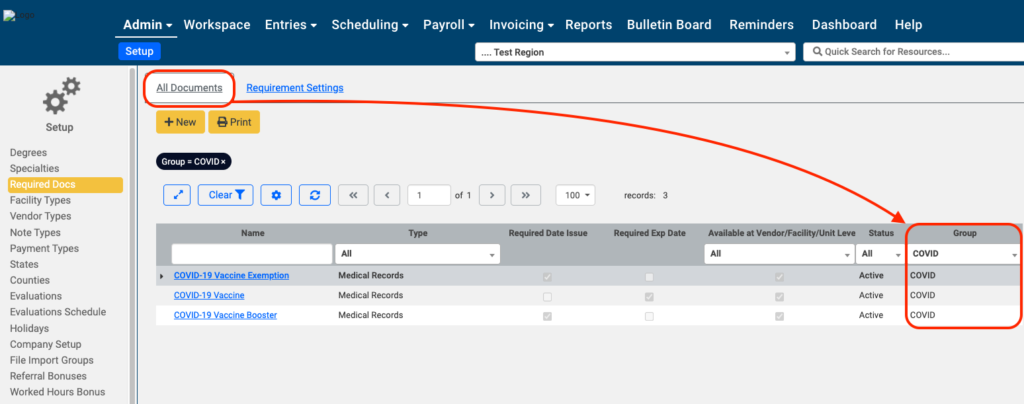
1a. We delivered a major overhaul of BlueSky’s Required Documents functionality this year, giving teams far more flexibility and control over credentialing. New configuration layers now allow requirements to be defined at the company, region, master vendor, and degree level.
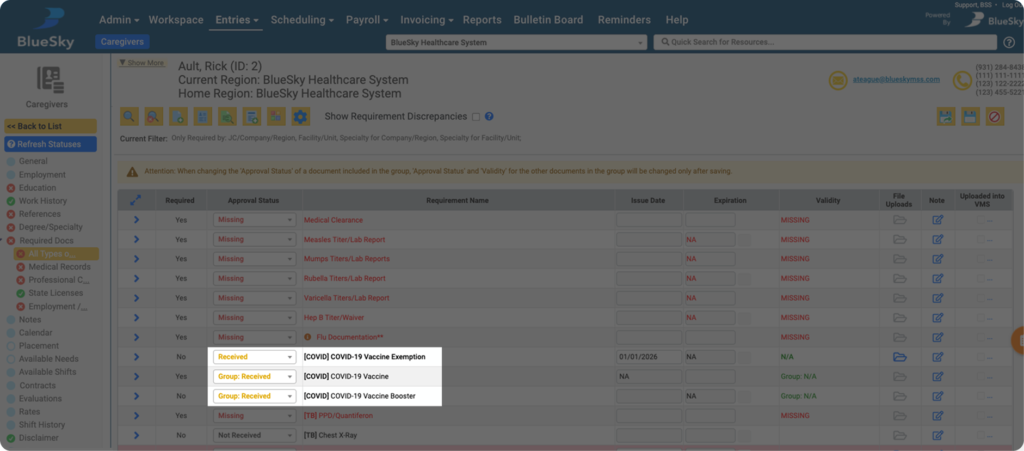
1b. We also introduced the highly anticipated Required Document Groups, enabling true either/or compliance. For example, if a requirement can be satisfied by a COVID vaccination, booster, or declination, those documents can now be grouped together. Once any one document in the group is submitted, the entire requirement is marked complete. This reduces redundant tracking, simplifies compliance management, and eliminates unnecessary document requests
2. Mobile App: Caregiver Availability Calendar:
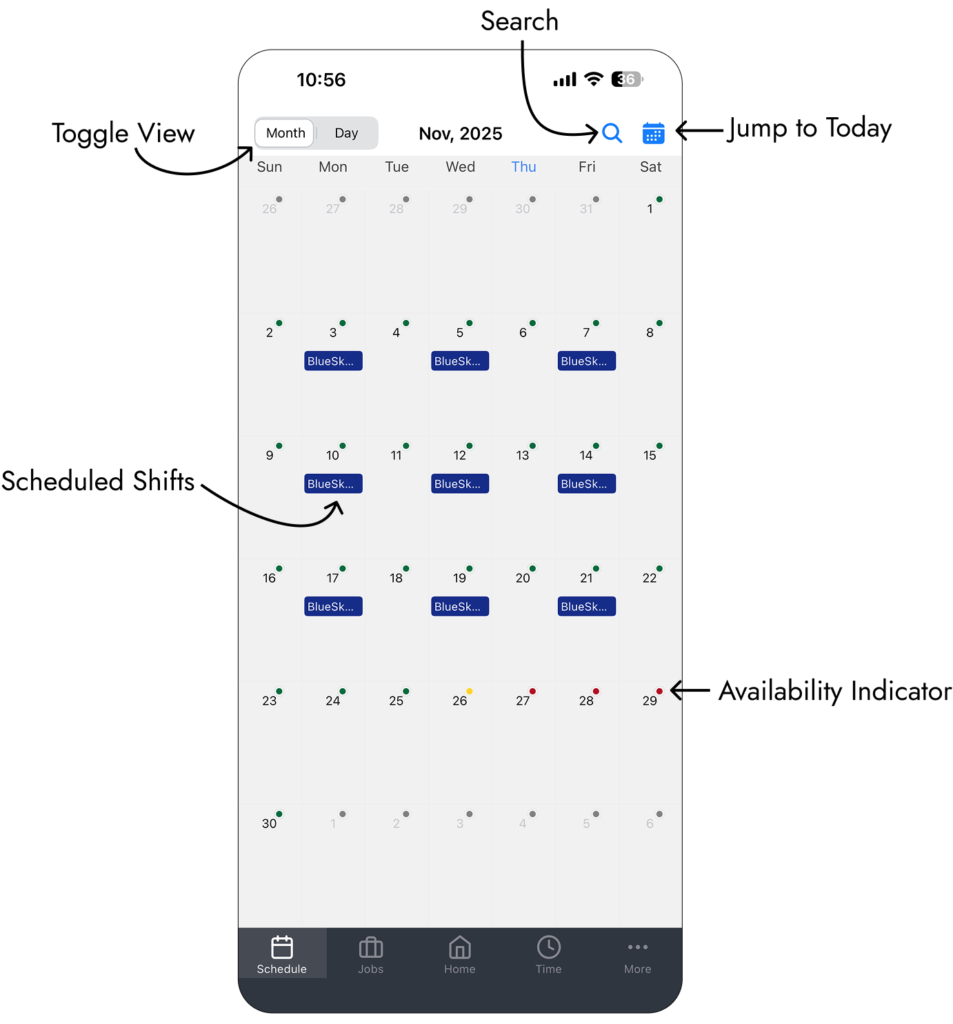
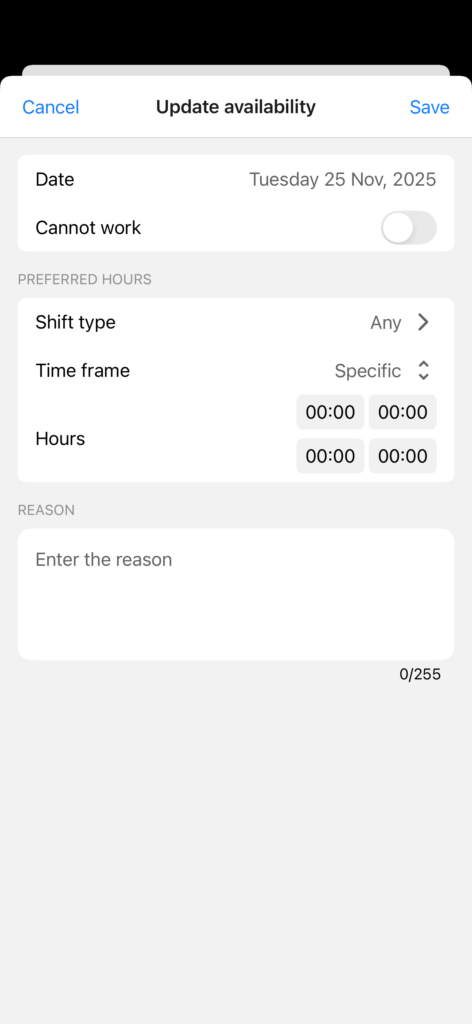
The BlueSky caregiver mobile app received a refreshed Schedule view with a full calendar layout. Caregivers can now enter daily availability and preferred shifts directly in the app, making it easier to communicate scheduling preferences. Availability updates sync instantly to the web portal, giving recruiters and schedulers real-time visibility without manual follow-up.
3. SignNow Integration:
BlueSky now offers SignNow as an additional e-signature integration alongside YouSignHere. SignNow supports the same deep integration across applications, required documents, contracts, and evaluations, while providing a modern, user-friendly signing experience. Teams can map BlueSky data fields, collect signatures digitally, and automatically store completed documents in the system.
4. Notification Emails for Reminders:
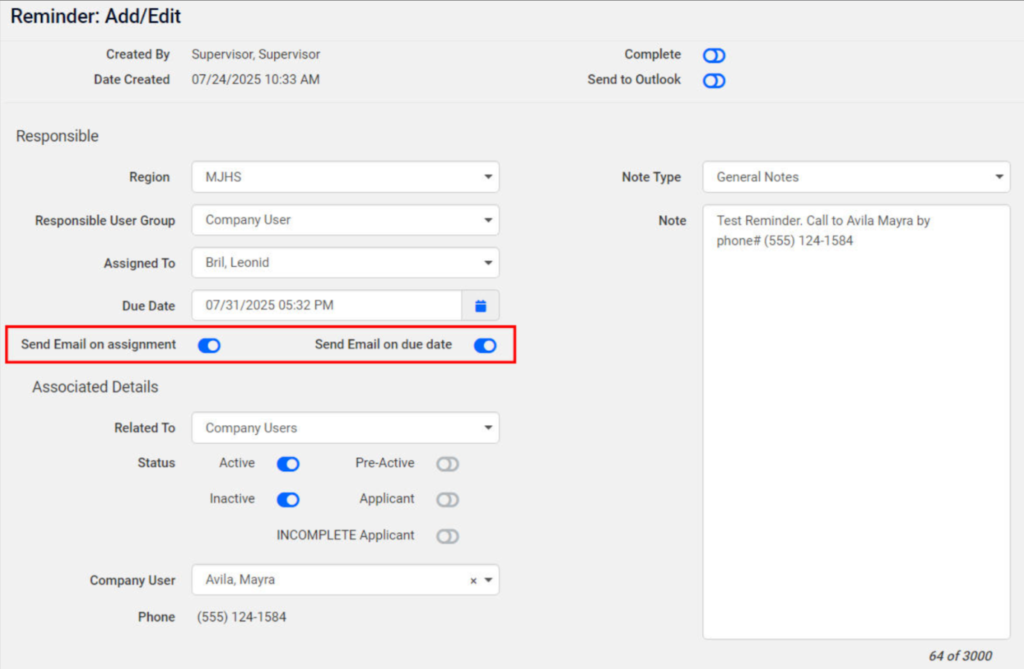
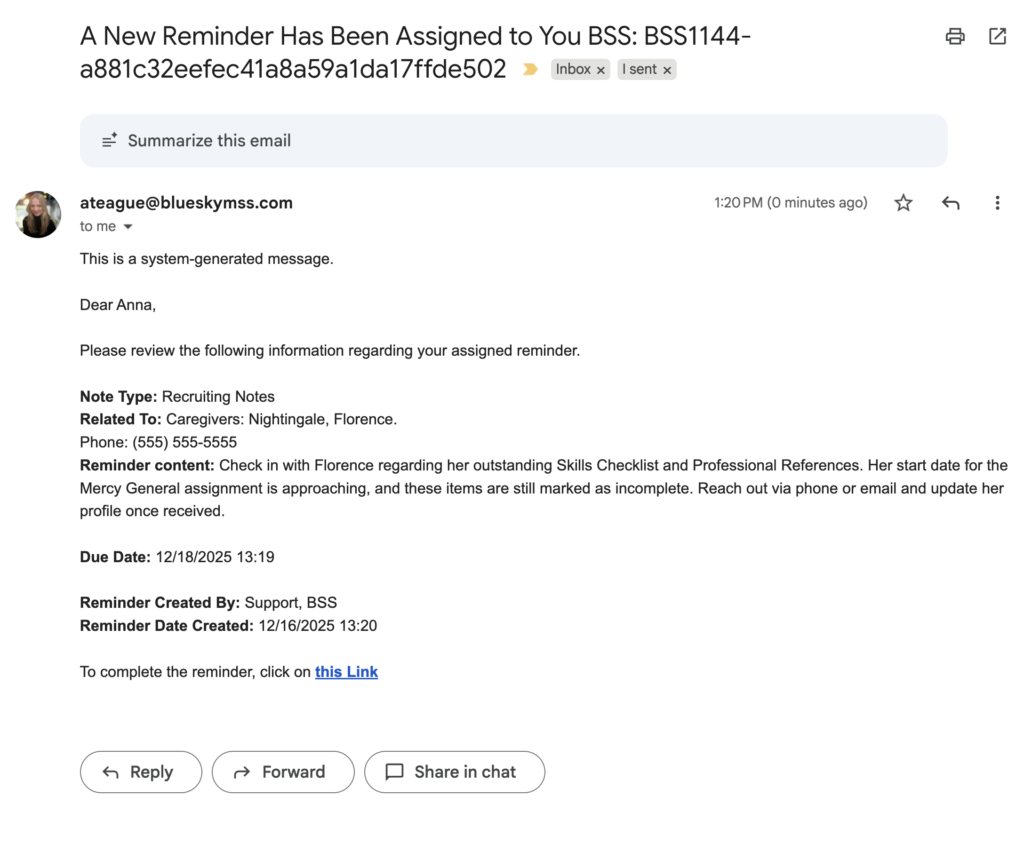
Reminders in BlueSky are now more actionable with automated email notifications. Assigned users can receive emails when a reminder is created and again on the due date, ensuring tasks don’t get missed. Emails include a one-click Mark as Complete option, allowing users to close out reminders directly from their inbox without logging into the system.
5. Add Bonus from the Shift Form:
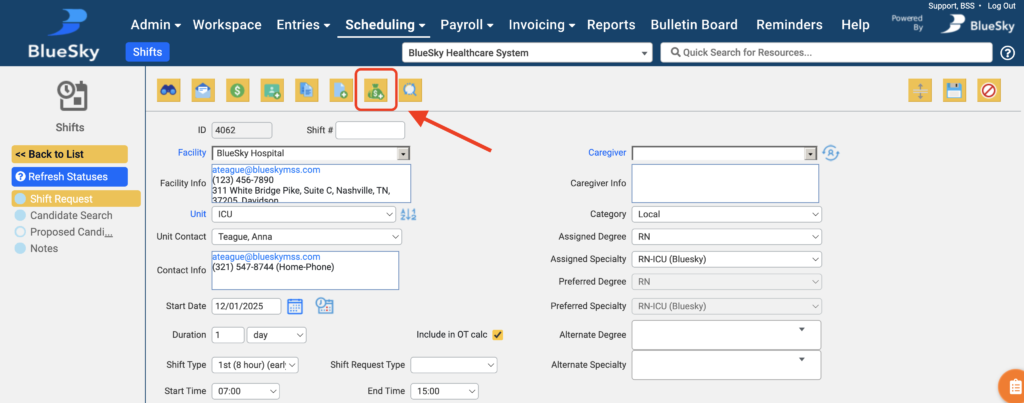
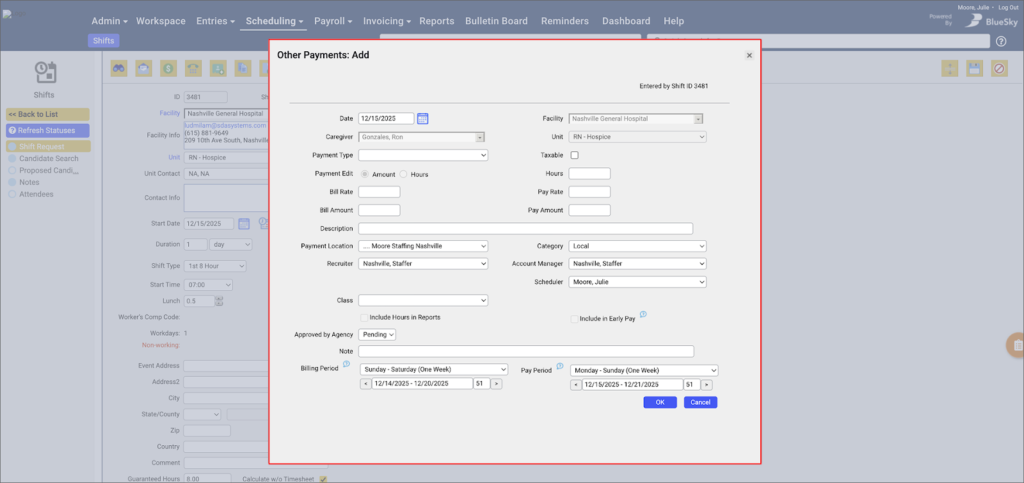
Bonuses and other payments can now be added directly from the shift scheduling screen. This streamlined workflow makes it easy to link payments to a specific shift without manual lookup, reducing errors and saving time when applying incentive pay.
6. Timesheet Subtotals at a Glance:
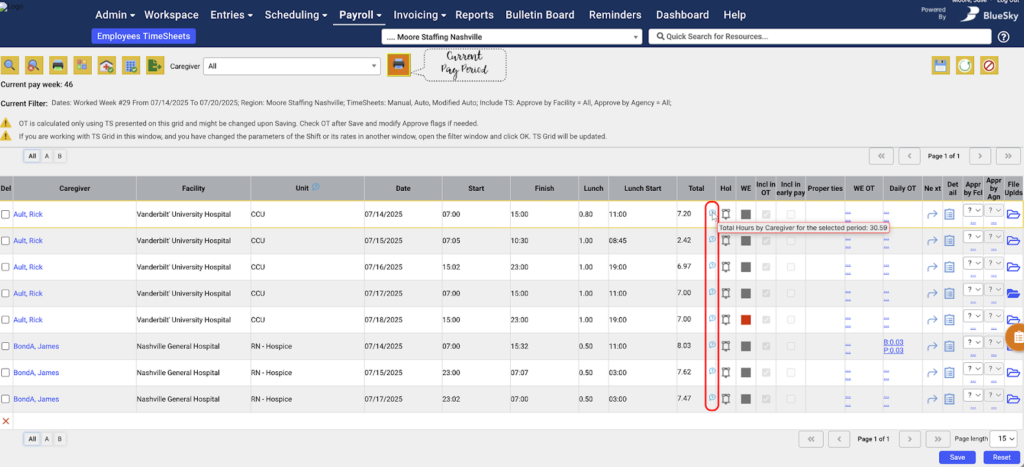
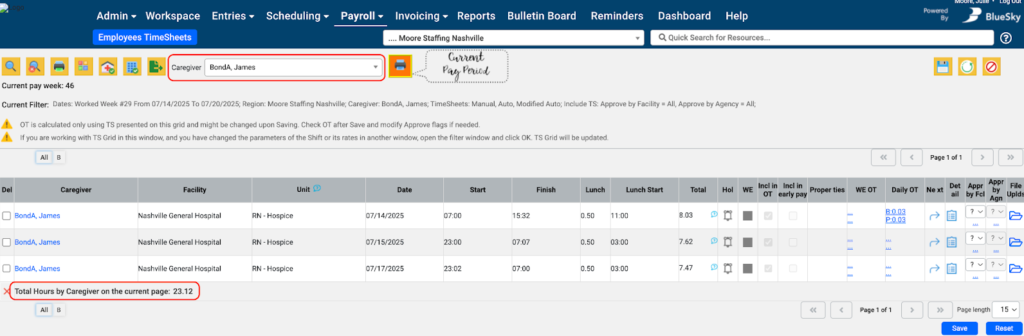
The Timesheets grid now provides quick visibility into worked hours. When viewing all caregivers, hover indicators show total hours worked for the selected period. When filtering to a specific caregiver, a running total appears at the bottom of the grid, giving instant insight into hours worked without exporting or manual calculation.
All 2025 Feature & Integration Updates for BlueSky Medical Staffing Software:
Mobile App: Caregiver Availability
Caregivers can now submit and update their availability and preferred hours directly from the mobile app. This gives caregivers more control over their schedules while ensuring teams always have up-to-date availability without relying on manual updates.
Mobile App: Submitting Other Payments
Caregivers can now submit Other Payments and expenses directly from the mobile app. Submitted payments are automatically imported into BlueSky with a pending approval status, eliminating manual entry and streamlining review and approval workflows.
Push Notification Configuration for Mobile App
Admins can now control which push notifications are available to caregivers from the web portal, without needing Support assistance. Each notification type can be turned on or off system-wide: when enabled, caregivers can manage it in the mobile app; when disabled, the notification is completely blocked for all caregivers.
Reject Caregiver Shift Applications
Users can now reject caregivers from open shifts by unchecking the Apply checkbox in the Candidate Search tabs, instantly removing them from consideration. Caregivers can also withdraw their own applications from the BlueSky Mobile app, supporting faster, more flexible per diem staffing workflows.
Redesigned Resume Import Form
The Resume Import Form has been redesigned with a clean vertical layout, eliminating horizontal scrolling and making all fields and action buttons immediately visible. This update improves usability and helps users complete resume imports more quickly and efficiently.
Updated Field Label for File Uploads
The file upload label previously shown as “Uploaded By” has been updated to “Last Modified By”, more accurately indicating the most recent user who made changes to the file and reducing confusion about file ownership.
Expanded Support for Military Time Display
Systems using 24-hour (military) time now see more consistent time formatting across additional pages and modules throughout BlueSky, including Admin, Facility, Unit, Caregiver, Reminders, and Reports. This improves clarity and reduces confusion for teams operating in 24-hour or multi–time zone environments.
New YouSignHere Tags for Contract Fields
Two new YouSignHere tags are now available for contracts: WorkingDaysCount, which returns the total number of working days, and JobReason, which pulls the contract’s Job Order Reason. These additions provide more flexibility for dynamic document generation and contract-related workflows.
New Integration: SignNow
BlueSky now offers a SignNow e-signature integration as an alternative to YouSignHere, supporting similar document workflows for onboarding, credentialing, and signatures. SignNow accounts, licensing, and billing are managed directly through signnow.com, with BlueSky providing the secure platform connection.
Improved Availability Change Email
The “Caregiver Changed Availability Calendar” email has been redesigned with a clear, table-based layout to make availability updates easier to read at a glance. The template is now available in the Email Template Editor, allowing teams to customize both the main message and the embedded availability table as needed.
Short Shift Creation Form: Comment Field Added
The Short Shift creation form now includes a Comment field, allowing users to add notes or instructions at the time of entry and align with the full shift creation experience.
Capture Interface: Master Vendor Display
The Job Robotix Capture interface now shows a read-only Facility Vendor field that displays the Master Vendor Name associated with the facility. This provides clearer visibility into vendor relationships directly within the Capture screen.
Workspace Dashboard Enhancements: Actions and Buttons
Dashboard widgets have been updated with a refreshed action bar, more reliable Excel exports (.xlsx), and a new Help button that provides widget-specific guidance. Additional improvements include bulk legend controls for isolating chart data and remembered display preferences when hiding or showing chart elements.
Submission Grid: New Need Filters
The Submissions Grid now includes searchable Need ID and Need # columns, making it easier to filter, sort, and locate specific assignment needs directly from the grid.
Recruiter Added to Contract vs. Actual Hours CSV
The Contract vs. Actual Hours CSV export now includes a Recruiter column, providing clearer visibility into which recruiter is associated with each assignment.
Timesheet Hour Subtotals at a Glance
The Timesheet Grid now shows total hours by caregiver in two ways: in the All Caregivers view, a hover icon in the Total column displays each caregiver’s full-period hours across all pages (updated after saving), while filtering to a specific caregiver adds a live subtotal at the bottom of the grid showing hours on the current page only.
Required Documents: More Control and Context
The Required Documents grid is now more flexible and informative, with customizable column views, saved layout preferences per user and tab, and responsive resizing for different screen sizes. Users can also add notes to documents even when they’re missing or not yet received, and multiple notes are now preserved as a running history instead of being overwritten, providing better context, traceability, and audit readiness during credentialing.
Mass Confirm by Facility: Notifications
Mass Confirm by Facility now includes a Notify option, allowing users to send confirmation emails to caregivers and facility contacts in the same bulk action. This removes the need to open individual shifts, while still respecting region-level “Don’t Send Email” settings.
Auto-Fill Unit Contact on Contracts
The Unit Contact field now auto-fills when manually creating a contract, matching the behavior used for needs and shifts. When a unit has contacts on file, the first contact is selected by default, reducing missed selections and preventing downstream issues when shifts are generated.
Smarter Version Control for Shifts
BlueSky now prevents conflicting shift edits by detecting when another user has changed a shift before your updates are saved. If this occurs, you’ll be prompted to reopen the shift to load the latest data, helping avoid overwrites and ensuring accuracy across all areas where shifts can be edited or managed.
Veteran Status Added to Export Builder
The Caregivers Export Builder now includes the Veteran Status field, making it easier to filter, export, and analyze caregiver data by veteran status.
SignNow Enhancements
SignNow now supports linking multiple templates to a single document type, allowing users to choose the appropriate template when sending caregiver contract requests. The SignNow setup grid has also been improved to show template names instead of IDs, making configuration easier to understand and manage.
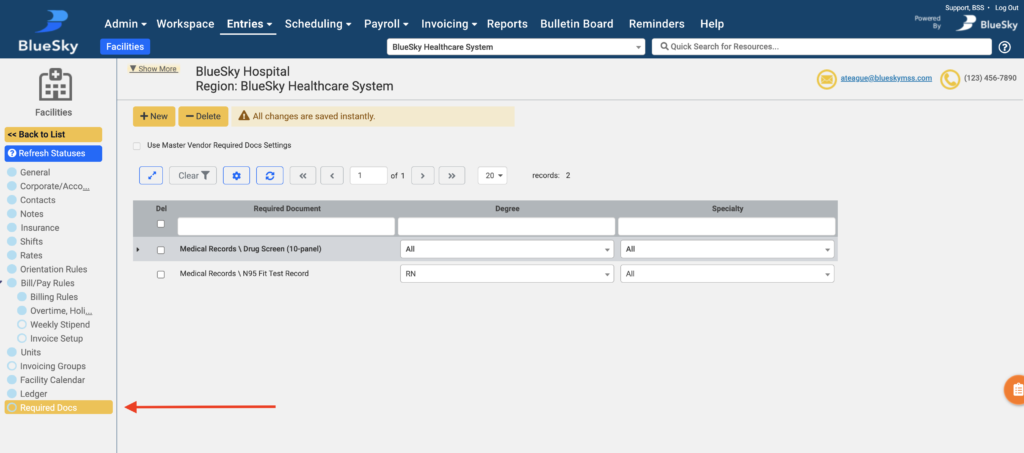
New Required Docs Tab for Facilities and Units
Facility and Unit profiles now include a Required Docs tab, providing a centralized view of credentialing requirements and clearly indicating which documents are inherited from parent entities. Admins can disable inheritance to customize requirements at the facility or unit level as needed.
Vendor-Level Required Documents
Vendor profiles now include a Required Docs tab, allowing admins to define credentialing requirements at the master vendor level that automatically flow down to linked facilities. Facilities can choose to inherit these requirements or use their own facility-level rules, reducing repetitive setup and simplifying compliance across large health systems.
Region-Level Required Documents
BlueSky now supports defining Required Documents at the Region level, allowing credentialing rules to be inherited from the company or explicitly overridden for specific regions. Requirements can be configured by employment type, degree, and specialty, giving organizations more flexible and scalable control over regional compliance needs.
Proposal Form Required Field Indicators
Required fields on the Proposal Form are now clearly marked with an asterisk (*), based on your company’s permission settings. This removes guesswork for users submitting proposals and helps reduce submission errors by clearly distinguishing required versus optional fields.
Notification Emails for Reminders
Reminders can now trigger automated email notifications when assigned to a user and, optionally, on the due date. These emails include full reminder details and a one-click option to mark the reminder complete, with new templates available in the Email Template Editor for customization.
Contract Non-Working Days Added to Export Builder
Export Builder for the Contracts grid now includes the Contract Non-Working Days field, allowing users to export all non-working dates defined on a contract in a clear, comma-separated format.
New Contract Permission Settings
New permissions allow admins to control visibility of the Create Shifts from Contract and New Contract buttons in the Contracts Grid. These settings improve role-based access by limiting who can create contracts or generate shifts from them.
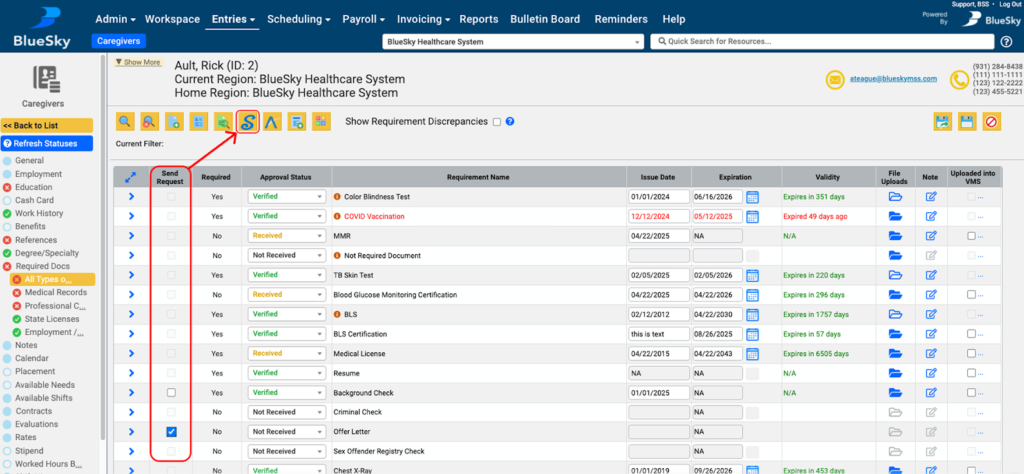
Configure Minimum Required Documents by Caregiver Degree
Minimum Required Documents for Proposals can now be configured by caregiver degree in addition to Company and Region levels, allowing credential requirements to vary by roles like RN, LPN, or CNA. The Proposal Form dynamically selects the applicable degree and automatically pulls the correct required documents, which are also highlighted in the Caregiver Required Docs grid, improving accuracy and eliminating prior workarounds for degree-specific compliance.
Timesheets: Caregiver Note Field
Timesheet Details now include a dedicated Caregiver Note field, allowing caregivers to add comments or context directly to individual timesheet entries.
New Year-to-Date Option in Workspace
The Workspace date range selector now includes a Year-to-Date option, allowing users to focus on current-year data with less manual filtering. All Contract Labor Metrics dashboard graphs support this option and default to the Year-to-Date view.
Updated Report Viewer
The Report Viewer has been upgraded to provide consistent PDF display across browsers, faster load times, and a cleaner interface with embedded actions for filtering, exporting, and emailing reports.
Required Doc Configuration Setting for Vendor, Facility, and Unit Pages
Document requirements can once again be managed directly from the General pages for Vendors, Facilities, and Units, now with improved multi-select and search capabilities. A new backend setting can make the Required Docs tabs read-only, ensuring requirements are maintained exclusively through the General tab interface when enabled.
Required Docs Interface Improvements
The Admin > Setup > Required Docs page has been streamlined with clearer separation between document management and requirement configuration. New tabs and a Region Settings control make it easier to define documents, assign requirements by region, degree, and specialty, and manage whether regions inherit or override parent-level rules.
Creating Required Documents: Updated Workflow
The Required Documents creation and edit flow has been streamlined with clearer save options and easier access to requirement settings. New buttons distinguish between saving a document with or without requirements, terminology has been clarified, and helpful messages now appear when no requirements are configured or filters return no results.
Facility Calendar Report: Exclude Cancelled Shifts
The Facility Calendar report now excludes cancelled shifts by default, with a new filter option available to include them when needed. This helps produce clearer schedules focused on active shifts.
New Email Tag for Scheduled Hours
The NumOfScheduledHoursPerWeek tag has been added to the “Notify Facility about Submission Accept” email template, automatically inserting the caregiver’s expected weekly scheduled hours based on the contract’s guaranteed hours.
New Options for Contract vs. Actual Hours Report
The Contract vs. Actual Hours report now includes a new calculation option “Hours per week minus non-working days” which adjusts expected weekly hours by accounting for non-working dates defined in the contract. This aligns the report with Revenue Projection logic and provides more accurate contract hour calculations.
Guaranteed Hours for Shifts
Shifts now support Guaranteed Hours, allowing organizations to ensure a minimum number of paid hours even if fewer hours are worked or no timesheet is submitted. When guaranteed hours exceed actual worked hours, BlueSky automatically generates an auto-payment for the difference.
Caregiver Evaluations Grid Modernized
The Caregiver Evaluations grid has been upgraded to a modern, responsive interface with improved filtering, customizable columns, and an optional list view for easier review. These enhancements make it faster to search, audit, and interact with evaluations while providing a cleaner, more consistent user experience across the system.
Updated “Incomplete Reminders” Dashboard Widget
The Reminders dashboard widget has been updated and renamed to Incomplete Reminders, now showing all open reminders by default instead of only past-due items. New due-date filtering options and clearer column labels make it easier to track current, future, and overdue tasks directly from the Workspace dashboard.
Required Document Groups (Either/Or Compliance)
BlueSky now supports Required Document Groups, allowing interchangeable documents to be grouped together so only one needs to be submitted to satisfy compliance. When any document in a group is received or verified, the remaining options are automatically marked as satisfied, reducing unnecessary uploads and clutter.
Add Bonus Directly from the Shift Form
Users can now add bonuses (Other Payments) directly from the Shift Request form using a new Add Bonus button, eliminating the need to manually reference a Shift ID. The bonus form opens with shift-linked fields pre-filled for accuracy, includes a duplicate warning for matching payment types, and has permission-based access controls. This streamlines shift-specific incentive pay while reducing errors and duplicate entries.
Workspace Dashboard Chart Enhancements
Dashboard charts now offer optional data labels, automatic totals for stacked bars and pie or donut charts, and flexible display controls. Users can toggle labels, view summed totals at a glance, and switch between stacked or unstacked and horizontal or vertical chart layouts to better interpret data.